
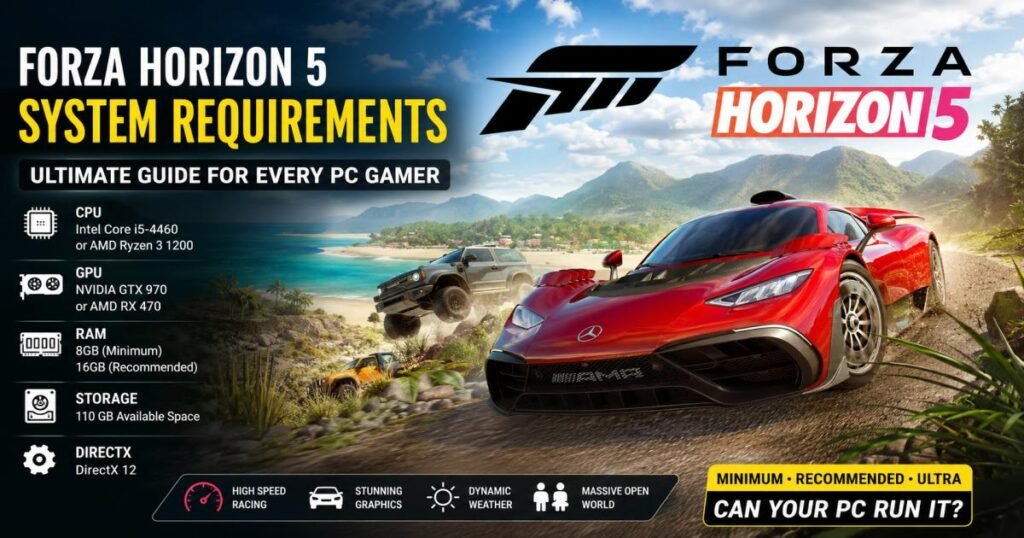
To meet the minimum Forza Horizon 5 system requirements, your PC needs an Intel i5-4460 or AMD Ryzen 3 1200 processor, an NVIDIA GTX 970 or AMD RX 470 graphics card, 8 GB of RAM, and 110 GB of available storage space.
However, to play comfortably at a smooth 60 frames per second (FPS) on High settings, the recommended Forza Horizon 5 PC specs jump to an Intel i5-8400 or Ryzen 5 1500X, 16 GB of RAM, and a GTX 1070 or RX 590 video card.
Playground Games built one of the most visually stunning open-world racing titles available. Driving through the Mexican landscape demands specific hardware capabilities. This guide breaks down exactly what your computer needs to run the game effectively, how to optimize your current setup, and which PC parts matter most.
Forza Horizon 5 at a Glance
Before examining the technical details, here are the core facts about the game.
Release Date
Microsoft released the game globally on November 9, 2021.
Developer and Publisher
Playground Games developed the title, and Xbox Game Studios published it.
Game Genre
It is an open-world arcade racing game. The mechanics blend realistic car physics with high-speed, accessible driving.
Supported Platforms
You can play on PC (Steam and Windows Store), Xbox One, Xbox Series X, and Xbox Series S.
Game Modes
Players can explore a single-player campaign, join co-op races, or compete in online multiplayer modes. The community remains highly active; even years after launch, the game typically draws between 10,000 and 15,000 concurrent players on Steam daily.
Current Game Size
You need a substantial 110 GB of installed storage space for the base game. Expansion packs increase this footprint further.
Official Forza Horizon 5 System Requirements
Microsoft provides three official performance tiers. Match your hardware against these lists to see how well the game will run.
Minimum System Requirements
These components run the game at 720p or 1080p on “Low” settings, averaging 30 FPS.
- OS: Windows 10 version 18362.0 or higher (64-bit)
- Processor (CPU): Intel i5-4460 or AMD Ryzen 3 1200
- RAM: 8 GB
- Graphics Card (GPU): NVIDIA GTX 970 / AMD RX 470 / Intel Arc A380
- DirectX: Version 12
- Storage: 110 GB available space
- Internet Requirement: Broadband connection for updates
Recommended System Requirements
This hardware tier delivers 1080p resolution on “High” settings at 60 FPS.
- OS: Windows 10 or Windows 11 (64-bit)
- Processor (CPU): Intel Core i5-8400 or AMD Ryzen 5 1500X
- RAM: 16 GB
- Graphics Card (GPU): NVIDIA GTX 1070 / AMD RX 590 / Intel Arc A750
- DirectX: Version 12
- Storage: 110 GB available space on a Solid State Drive (SSD)
- Internet Requirement: Broadband connection
Ideal Requirements for High Graphics (Ultra Settings)
To play at 1440p or 4K resolution on “Extreme” settings with ray tracing turned on, you need a high-end desktop.
- CPU: Intel Core i7-10700K or AMD Ryzen 7 3800XT
- GPU: NVIDIA RTX 3080 or AMD Radeon RX 6800 XT
- RAM: 16 GB or higher
- SSD: 110 GB NVMe SSD space
- Resolution: 4K monitor recommended
Forza Horizon 5 System Requirements (Comparison Table)
Here is a direct comparison of the hardware needed across the three primary performance tiers.
| Component | Minimum (Low / 30 FPS) | Recommended (High / 60 FPS) | Ultra/4K (Extreme / 60 FPS) |
| Processor | i5-4460 / Ryzen 3 1200 | i5-8400 / Ryzen 5 1500X | i7-10700K / Ryzen 7 3800XT |
| Graphics Card | GTX 970 / RX 470 | GTX 1070 / RX 590 | RTX 3080 / RX 6800 XT |
| RAM | 8 GB | 16 GB | 16 GB |
| Storage Space | 110 GB (HDD works) | 110 GB (SSD required) | 110 GB (NVMe SSD required) |
| Video RAM | 4 GB | 8 GB | 10 GB+ |
Can Your PC Run Forza Horizon 5?
If you do not know your exact computer parts, you can find out quickly.
How to Check Your PC Specifications
Windows Method
Click the Windows Start button, type “About your PC,” and press Enter. This screen displays your Processor (CPU) model and installed RAM amount.
DirectX Diagnostic Tool
Press the Windows Key + R to open the Run box. Type dxdiag and hit Enter. The first tab shows your CPU and RAM. Click the “Display” tab to find your Graphics Card model and VRAM.
Task Manager Method
Press Ctrl + Shift + Esc to open the Task Manager. Click the “Performance” tab. Select CPU, Memory, or GPU on the left menu to view your specific hardware names.
Minimum vs Recommended vs Ultra Requirements
Hardware directly dictates your gameplay experience. Here is what changes between the minimum specs for FH5 and a high-end rig.
- Difference in graphics quality: Minimum specs render flat lighting and blurry road textures. Ultra settings show individual leaves, sharp tire marks, and realistic puddle reflections.
- FPS expectations: Minimum hardware targets 30 FPS, similar to older consoles. Recommended hardware hits 60 FPS, making steering feel responsive. Ultra hardware can push past 120 FPS on high refresh rate monitors.
- Loading times: Low-end PCs with mechanical drives take a long time to load races. High-end machines load environments almost instantly.
- Gameplay experience: Fast frame rates improve reaction times. Dodging traffic at 200 MPH requires the fluid motion that 60 FPS provides.
- Ray tracing support: The game uses ray tracing for realistic audio bouncing and car reflections. You need an RTX-series or newer Radeon RX graphics card to run these features without severe frame drops.
Storage Requirements Explained
Racing games require massive storage space to hold high-resolution car models and map data.
Download Size
The initial Forza Horizon 5 download size is roughly 103 GB. If you have a slow internet connection, start the download overnight.
Installed Size
Once uncompressed and fully installed, the game occupies 110 GB on your drive.
Future Updates
Playground Games regularly adds new festival playlists and vehicles. Always keep an extra 15 to 20 GB of free space available so patches can install correctly.
Why an SSD Is Recommended
Driving fast forces your PC to load environmental assets rapidly. Mechanical hard drives (HDDs) spin too slowly to keep up. If you use an HDD, you will likely experience “low streaming bandwidth” errors where the road disappears or the game freezes completely. A solid-state drive (SSD) fixes this issue entirely.
Graphics Card Requirements
Your GPU renders the visuals. It is the most important component for this title.
NVIDIA GPUs
A GTX 1060 or GTX 1650 handles Low or Medium settings well. The GTX 1070 serves as the baseline for a good 1080p experience. For 1440p or 4K gaming, look for an RTX 3070, RTX 4060, or higher.
AMD GPUs
An older RX 570 runs the game on lower settings. The RX 6600 offers fantastic 1080p performance. If you want maximum graphics, an RX 6800 XT or RX 7800 XT delivers excellent results.
Intel Arc GPUs
Intel’s discrete graphics cards run this engine effectively. The Arc A380 works for budget builds, while the Arc A750 easily clears the recommended requirements.
VRAM Recommendations
Video RAM (VRAM) stores textures. You need 4 GB for basic gameplay. Aim for 8 GB for 1080p High settings, and 10 GB to 12 GB if you plan to play at 4K resolution.
Processor (CPU) Requirements
While the GPU handles graphics, the CPU calculates car physics, AI traffic behavior, and multiplayer network syncing.
- Intel CPUs: A modern Core i3-12100F easily outperforms the older minimum requirements. An i5-12400F provides excellent midrange performance.
- AMD Ryzen CPUs: Upgrading from the minimum Ryzen 3 to a Ryzen 5 5600 stops background stuttering and keeps gameplay smooth.
- Core count recommendations: The game engine favors multi-core processors. A CPU with 6 physical cores provides the most stable frame rates.
- CPU bottlenecks: Pairing a powerful graphics card (like an RTX 4070) with an old 4-core CPU forces the graphics card to wait for instructions. This creates noticeable stuttering during races.
RAM Requirements
Memory allows your PC to track the open world in real-time.
Is 8GB RAM Enough?
Yes, 8 GB meets the minimum requirement. The game will launch. However, you will need to close web browsers and background apps to prevent the game from freezing in densely populated map areas.
Why 16GB Is Recommended
PC gaming currently centers around 16 GB of RAM. At this capacity, the game runs smoothly, and you can keep chat applications or music players open in the background without causing performance drops.
Benefits of 32GB
You do not strictly need 32 GB for this game alone. But if you stream gameplay to Twitch or record footage while playing, 32 GB stops your system from running out of memory.
Best PC Settings for Maximum FPS
Adjusting your Forza 5 PC settings offers a free way to improve performance. Use these baselines depending on your hardware.
Low-End PC Settings
- Resolution: 1080p
- Dynamic Optimization: Off
- Shadows: Low
- Environment Texture Quality: Medium
- Anti-Aliasing: FXAA
Mid-Range PC Settings
- Resolution: 1080p
- Dynamic Optimization: Off
- Shadows: High
- Environment Texture Quality: High
- Reflection Quality: Medium
- Anti-Aliasing: MSAA 2x
High-End PC Settings
- Resolution: 1440p or 4K
- Dynamic Optimization: Off
- Shadows: Ultra
- Environment Texture Quality: Extreme
- Reflection Quality: Ultra
- Anti-Aliasing: MSAA 4x or DLSS Quality Mode
Expected FPS Performance
Different hardware tiers produce different results. Here is what you can typically expect.
| Hardware Level | Example GPU | 1080p FPS | 1440p FPS | 4K FPS |
| Entry Level | GTX 1650 | ~55 (Med settings) | ~35 (Low settings) | Not recommended |
| Mid-Range | RTX 3060 / RX 6600 | ~90 (High settings) | ~65 (High settings) | ~35 (Med settings) |
| High-End | RTX 4070 / RX 7800 XT | ~144+ (Ultra settings) | ~110 (Ultra settings) | ~70 (High settings) |
Best PCs and Laptops for Forza Horizon 5
If you are buying new hardware, these configurations work best.
Budget Build
A desktop with an Intel i3-12100F, an AMD RX 6600, and 16 GB of RAM handles 1080p racing perfectly. For a laptop, look for models featuring an RTX 3050.
Mid-Range Build
A desktop using a Ryzen 5 7600 and an RTX 4060 provides enough power for 1440p monitors. Laptops with an RTX 4060 mobile chip offer similar performance.
High-End Build
A Ryzen 7 7800X3D processor paired with an RTX 4080 Super will run the game flawlessly at 4K. Laptops require an RTX 4080 or RTX 4090 to achieve this level of fidelity.
Common Performance Issues and Fixes
Software conflicts or outdated hardware occasionally cause problems.
Low FPS
Ensure you plugged your monitor directly into your dedicated graphics card, not the motherboard port. Check the in-game settings to verify your resolution scaling is set to 100%.
Stuttering
Stuttering usually happens when you install the game on a mechanical hard drive or run out of RAM. Close unnecessary background applications.
Crashing
Run the game as an Administrator. Disable overlay software like Discord, MSI Afterburner, or Xbox Game Bar, as these frequently cause launch crashes.
Graphics Glitches
If textures look broken or display rainbow colors, your graphics card is running out of VRAM. Lower the “Environment Texture Quality” setting.
Driver Issues
Always download graphics drivers directly from NVIDIA, AMD, or Intel. Windows Update often installs outdated driver versions that cause game errors.
How to Optimize Forza Horizon 5 for Better Performance
Follow these steps to improve your frame rate quickly.
- Update GPU drivers: Install the latest “Game Ready” (NVIDIA) or “Adrenalin” (AMD) drivers.
- Enable Game Mode: Search “Game Mode” in Windows and turn it on to prioritize system resources for gaming.
- Close background apps: Shut down web browsers to free up processor power and memory.
- Adjust graphics settings: Turn down Shadows and Reflections first. They consume heavy GPU resources but remain hard to notice at high speeds.
- Enable DLSS/FSR: If your graphics card supports it, turn on Deep Learning Super Sampling (NVIDIA) or FidelityFX Super Resolution (AMD). These tools boost frame rates with minimal visual loss.
- Install on SSD: Move the game files to a solid-state drive.
- Keep Windows updated: Install current operating system updates to fix compatibility bugs.
Forza Horizon 5 Graphics Settings Explained
Understanding the video menu helps you balance visual quality and performance.
Texture Quality
This setting dictates the sharpness of the road and cars. It uses very little processor power but requires a lot of VRAM. Keep it on High if your card has 8 GB of VRAM.
Shadows
Shadow quality heavily impacts frame rates. Lowering this setting to Medium offers an immediate performance boost on older PCs.
Anti-Aliasing
This removes jagged edges from the screen. MSAA looks excellent but drains performance. FXAA requires almost no power but makes the image slightly blurry.
Reflections
Reflections calculate light bouncing off car paint and water. High or Ultra settings demand significant GPU power. Medium looks fine during fast races.
Environment Quality
This controls how far you can see objects in the distance. Lowering it improves FPS, but you will notice trees abruptly appearing on the horizon as you drive toward them.
Is Forza Horizon 5 Worth Playing in 2026?
Yes. The game remains a benchmark for open-world racing.
- Graphics: The engine still outpaces many newer racing releases.
- Gameplay: The controls offer a satisfying mix of arcade drifting and sim-lite physics.
- Multiplayer: You will never struggle to find an online race. The active community still brings 10,000 to 15,000 concurrent players to Steam every single day.
- Ongoing updates: The developers continue launching festival playlists and reward cars.
- Community activity: Players constantly upload thousands of custom tuning setups and track designs.
Frequently Asked Questions (FAQ)
What are the minimum Forza Horizon 5 system requirements?
You need an Intel i5-4460 or Ryzen 3 1200 processor, a GTX 970 or RX 470 graphics card, 8 GB of RAM, and 110 GB of storage.
Can I play Forza Horizon 5 with 8GB RAM?
Yes. The game runs on 8 GB of RAM, but you must close other applications to maintain stable performance. 16 GB is heavily recommended.
Is an SSD required for Forza Horizon 5?
An SSD is practically mandatory. While a traditional hard drive technically works, it often fails to load the map fast enough, causing the game to freeze during high-speed driving.
Can I run Forza Horizon 5 without a dedicated graphics card?
Playing on integrated processor graphics results in very poor performance. A dedicated GPU is necessary for an acceptable experience.
How much storage does Forza Horizon 5 need?
You need 110 GB of free space on your drive for the base game to install and run properly.
Can I play Forza Horizon 5 on Windows 11?
Yes. The game runs perfectly on both Windows 10 and Windows 11.
Which graphics card is recommended?
Microsoft recommends a GTX 1070 or RX 590. For modern systems, an RTX 3060 or RX 6600 offers great value and performance.
Is Forza Horizon 5 CPU or GPU intensive?
The game relies most heavily on the GPU to render the world. However, a capable multi-core CPU is still required to manage physics and prevent stuttering.
Can laptops run Forza Horizon 5?
Yes. Modern gaming laptops equipped with a dedicated graphics card, such as an RTX 3050 or higher, play the game smoothly.
Does Forza Horizon 5 support ray tracing?
Yes. The game features ray tracing in the Forzavista viewing mode and uses it for accurate audio rendering during gameplay on higher settings.
How much VRAM is recommended?
You typically need 6 GB to 8 GB of VRAM to comfortably handle High settings at 1080p resolution.
What FPS can I expect at 1080p?
If your PC meets the recommended requirements, you will typically average 60 FPS on High settings.
Final Verdict
Forza Horizon 5 offers an accessible, visually spectacular racing experience. The developers optimized the engine brilliantly, allowing it to run on older hardware while still scaling up to push modern 4K gaming rigs to their limits.
The ideal configuration for most players is a desktop featuring a 6-core processor, 16 GB of RAM, an SSD, and a midrange graphics card like the RX 6600. Upgrading your storage from an HDD to an SSD represents the single best hardware change you can make to improve your time in Mexico. Match your settings to your hardware, join the 10,000+ daily active players, and start racing.