
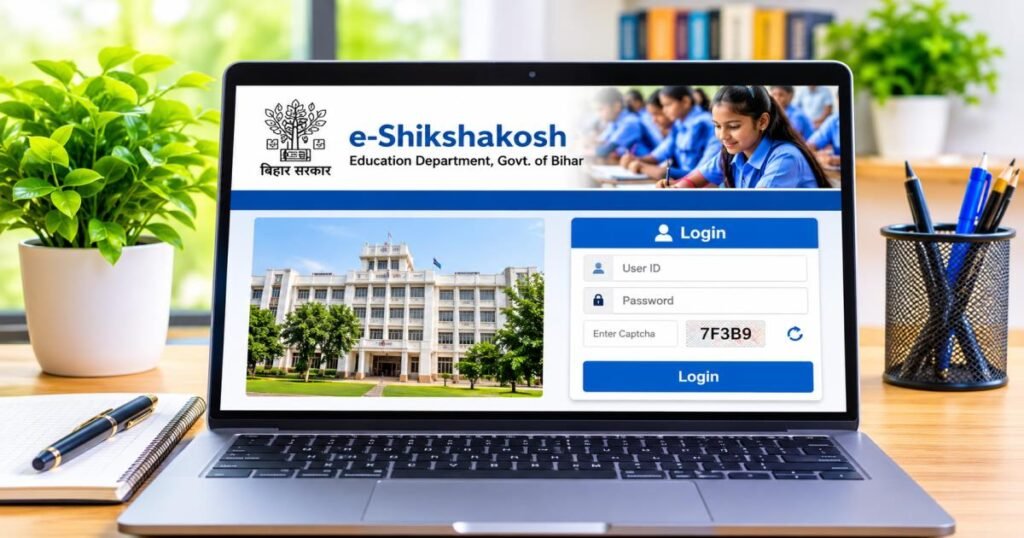
The official eshiksha bihar gov in login happens at https://eshikshakosh.bihar.gov.in. Open that address, choose your correct user type, enter the User ID and password issued to you, solve the captcha, and submit. You then reach your personal dashboard. No public demo eshiksha bihar gov in login password exists, and no open demo account is available for anyone to try. Credentials come only after official verification by the school or district education office.
This page walks you through every practical step teachers, headmasters, and officials need. You will see how to log in, recover a lost password, fix the usual errors, and stay on the real government site instead of look-alike pages.
What is the e-ShikshaKosh Bihar Portal?
The Bihar Education Project Council runs e-ShikshaKosh as the single online system for government and government-aided schools across the state. Teachers, headmasters, and education officers use it every day to handle records that once sat in paper files.
Purpose of the e-ShikshaKosh Education Portal
The portal collects teacher attendance, leave requests, student enrollment, school infrastructure details, and service information in one place. Officials can check reports without asking schools to send physical copies. Teachers can view their own service book and salary-related notes when the modules are open. The system links school data to the national UDISE+ codes so numbers stay consistent.
Who Can Use the Portal?
Registered government school teachers (regular and Niyojit), headmasters, school administrators, block education officers, district officers, and other authorized staff receive login rights. A new teacher cannot open an account alone. The headmaster or district MIS coordinator submits the details, the system generates a Teacher ID after checks, and the credentials reach the teacher through official channels. Students and private citizens do not receive general login access.
Key Features and Available Services
After login you can open your profile, mark attendance, apply for leave, check training notes, update student lists (school login), raise a grievance ticket, and view notifications about transfers or circulars. The mobile app adds camera-based attendance and school inspection tools for field work. Modules such as e-library and project monitoring appear according to your role.
Eshiksha Bihar Gov In Login Portal: Official Website Link
The only correct address for the eshiksha bihar gov in login portal is https://eshikshakosh.bihar.gov.in. Type it yourself or save it as a bookmark after you confirm the address bar shows the government domain.
How to Identify the Official Government Website
Check the ending .bihar.gov.in. The page shows clear user-type choices, a captcha (often a simple sum), and Bihar Education Project Council branding. Pages that ask for payment, promise an instant demo eshiksha bihar gov in login result, or use domains such as .org, .in.net, .co or .info are not official.
Direct Login Link for Bihar Teachers and Authorized Users
Go straight to https://eshikshakosh.bihar.gov.in. The login box sits on the homepage. Choose Teacher, School, Official, or the Niyojit option when it appears, then enter your details. Some modules open through extra buttons on the same page, yet the main entry stays here.
Difference Between the Official Portal and Third-Party Websites
Search results often show sites that rewrite older steps and add “demo” language. Those pages cannot create real accounts or reset government passwords. They sometimes collect personal details. Always return to the .gov.in address and ignore promises of a free demo eshiksha bihar gov in login password.
How to Complete the e-ShikshaKosh Bihar Login Process
Follow the five steps in order. Choosing the wrong user type causes most failed attempts.
Step 1: Visit the Official e-ShikshaKosh Website
Open a current browser and type https://eshikshakosh.bihar.gov.in. Confirm the address before you type anything else.
Step 2: Select the Appropriate Login Option
Pick Teacher, School, Official, Niyojit Teacher, or Other from the list. Teachers who select School by mistake see an error even when the password is correct.
Step 3: Enter Your User ID and Password
Teachers enter the 12-digit Teacher ID. Schools enter the 11-digit UDISE+ code. Officials enter the departmental ID given to them. Type without extra spaces and watch the Caps Lock key.
Step 4: Solve the Captcha Verification
Answer the math problem or type the characters shown. If the image looks blurred, click the reload icon and try again.
Step 5: Submit Your Details and Access Your Account
Press the sign-in button. A successful login opens your dashboard. Some actions later ask for an OTP sent to the mobile number linked to the account.
e-ShikshaKosh Bihar Teacher Login Guide
Login Process for Regular Teachers
Select Teacher, type the 12-digit Teacher ID, enter the password, solve the captcha, and submit. Keep the registered mobile number switched on because the system often sends an OTP for password recovery or sensitive changes.
Niyojit Teacher Login: Steps and Requirements
Niyojit teachers use the same Teacher path once the ID is active. A separate Niyojit Teacher Update Login button may appear on the homepage for profile corrections. Use that button only when you need to update details; otherwise the main Teacher login works.
What to Do If Your Teacher Login Credentials Are Unavailable
Speak first to your headmaster. The school login can check or start the request. If the ID still does not appear, the Block Education Officer or District MIS coordinator finishes the process after they verify documents such as the appointment letter and Aadhaar-linked mobile number. Self-registration is not possible.
e-ShikshaKosh School and Official Login
School Login Process
Select School, enter the school’s 11-digit UDISE+ code as the User ID, type the password, complete the captcha, and submit. This login opens student lists, teacher records, and school reports.
Headmaster and School Administrator Access
The same school credentials open extra headmaster tools inside the dashboard. From there a headmaster can add teacher details, review attendance summaries, and handle certain approvals.
Login Access for Authorized Education Officials
Officers select Official (or the matching role), enter their departmental User ID and password, and finish the captcha. Their dashboards show monitoring screens and grievance queues rather than direct edits to individual teacher files.
How to Reset Your e-ShikshaKosh Bihar Login Password
Steps to Use the Forgot Password Option
On the login page click the Forgot Password link. Enter your User ID, solve the captcha, and request the OTP. The code arrives on the mobile number registered with the account.
Information Required for Password Recovery
You need the correct User ID and access to the registered mobile number. Keep that number active and free of network problems.
What to Do If Password Reset Does Not Work
Wait two or three minutes and request the OTP again. Switch between mobile data and Wi-Fi if the message fails to arrive. When the mobile number itself has changed, the headmaster or District Education Office must update the profile with proof. Repeated wrong attempts can lock the account for a short time; wait and try later or ask the school office for help.
What Can You Do After Logging In to e-ShikshaKosh?
Accessing Teacher Profiles and Service Information
Open your profile to see personal details and service-book entries. Update contact information when the system allows and the mobile number stays current.
Understanding Attendance and Leave-Related Services
Mark daily attendance through the portal or the mobile app. Apply for leave online, attach documents when needed, and track the approval status. Many districts now require online leave applications instead of paper forms.
School Administration and Student Data Management
School logins add or correct student records, keep infrastructure notes, and produce reports that feed into UDISE+.
Accessing Available Education Resources and Training Services
Browse e-library materials, training modules, and departmental notices. The dashboard shows open windows for transfers or other applications when the department activates them.
e-ShikshaKosh Bihar Login Problems and Their Solutions
Invalid User ID or Password
Confirm you chose the right user type. Re-type the ID and password carefully. Reset the password if the system still rejects the details.
Captcha Verification Errors
Reload the captcha image. Switch browsers or clear the cache if the characters stay hard to read.
Forgot Password or Cannot Access Your Account
Start with the official Forgot Password link. If the OTP never arrives, the registered mobile number may be outdated. Ask the headmaster or district office to correct it.
Login Page Not Loading or Website Not Responding
Check your internet connection. Try another browser or device. Heavy traffic during transfer application periods can slow the page; try again later in the day.
OTP or Registered Mobile Number Issues
Confirm network signal, wait briefly, and request a new OTP. Number changes require official paperwork through the school or district office.
Account Access Problems After Multiple Login Attempts
Stop trying for a while so any temporary lock can clear. Contact the school administrator if the problem continues after a short wait.
How to Access the e-ShikshaKosh Portal on a Mobile Phone
Logging In Through a Mobile Browser
Open https://eshikshakosh.bihar.gov.in in the phone browser, select your user type, and complete the same steps used on a computer. A steady connection helps the page load fully.
Using the Official e-ShikshaKosh Mobile App
Search for the e-ShikshaKosh app published by the Bihar Education Project Council on the Google Play Store and install only from that store. The app supports attendance capture with location checks, school inspections, leave marking, and nearby-school search. Login uses the same Teacher ID or school credentials. Keep the app updated for the latest fixes.
Common Mobile Login Problems and Troubleshooting
Update the app, grant camera and location permissions for attendance features, clear the cache, or switch between mobile data and Wi-Fi. GPS errors for attendance improve when you stand outdoors with a clear sky view.
Is the e-ShikshaKosh Bihar Portal Safe to Use?
The official site and app protect accounts with passwords, captchas, OTPs, and extra checks for high-risk actions. Safety depends on using only the real address and never sharing your credentials.
How to Verify the Official Website Address
Look at the address bar every time. It must read https://eshikshakosh.bihar.gov.in. Save the correct page as a bookmark and avoid links sent in messages from unknown numbers.
Protecting Your Login Credentials and Personal Information
Never share your password or OTP with anyone. Log out when you finish on a shared computer. Update the registered mobile number through official channels as soon as it changes.
Avoiding Fake Login Pages and Unofficial Websites
Ignore any page that offers a demo eshiksha bihar gov in login or a ready-made password. Those pages cannot give real access and may collect personal details. Stay on the government domain.
e-ShikshaKosh Bihar Login Helpdesk and Support
Official Portal Helpdesk Contact Information
Support numbers and emails linked to the Bihar Education Project Council appear in official guidance and the app listing. Common contacts include helpdesk lines such as 0612-2215181 and related numbers, plus emails such as helpdesk.esks@gmail.com. After login you can also open the grievance module and raise a ticket that generates a tracking number.
When to Contact Your Headmaster or School Administrator
Start here for missing Teacher IDs, simple profile corrections, or school-level checks. Most first-level credential problems end at this stage.
When to Seek Assistance From the Relevant Education Office
Move to the Block Education Officer, District MIS coordinator, or District Education Officer when the mobile number needs updating, the ID generation is delayed, or the system problem continues after the school has tried. Keep appointment letters and identity documents ready.
Final Thoughts on Eshiksha Bihar Gov In Login
Use only https://eshikshakosh.bihar.gov.in for the Eshiksha Bihar Gov login. Choose the correct user type, keep your password and registered mobile number current, and turn to the headmaster or education office when self-service options stop working. These simple habits keep your account safe and your school data accurate.
Frequently Asked Questions About Eshiksha Bihar Gov In Login
What Is eshiksha bihar gov in login?
It is the process of signing into Bihar’s official e-ShikshaKosh portal at https://eshikshakosh.bihar.gov.in with the User ID and password issued by the education department.
What Is the Official Website for e-ShikshaKosh Bihar?
The only official website is https://eshikshakosh.bihar.gov.in.
How Can Teachers Log In to the e-ShikshaKosh Portal?
Select Teacher, enter the 12-digit Teacher ID and password, solve the captcha, and submit. An OTP may appear for recovery or sensitive steps.
How Do Niyojit Teachers Access Their Accounts?
Niyojit teachers use the Teacher option once their ID is active, or the dedicated Niyojit update button when it appears on the homepage for profile changes.
What Should I Do If I Forget My e-ShikshaKosh Password?
Click Forgot Password on the official login page, enter your User ID, and complete OTP verification on the registered mobile number. If that fails, ask the headmaster or district office for help.